Komo Workflows enable you to automate, customize, and extend your Komo experience by building powerful, no-code or low-code flows. With Workflows, you can create custom journeys for your users, integrate with external systems, and manipulate data within Komo, all without writing any code.
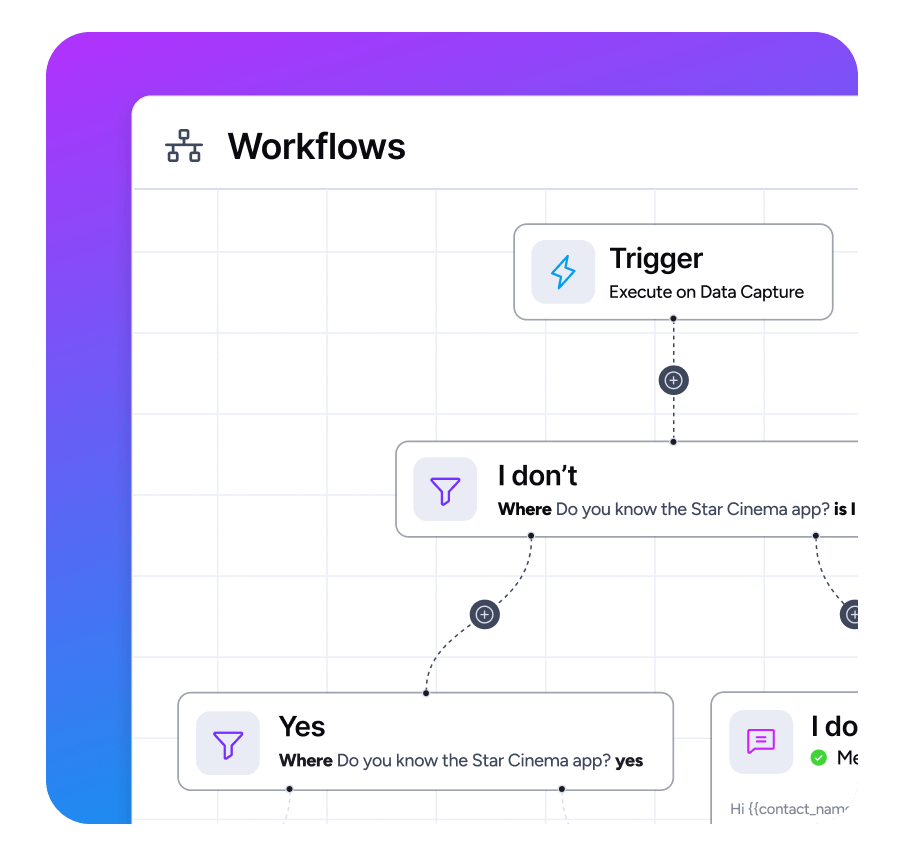
What are Workflows?
Workflows are a flexible automation tool in Komo that let you:
- Automate business logic and user journeys
- Trigger actions based on events (e.g., form submissions, prizes awarded, coupon redemptions)
- Integrate with external REST APIs (send HTTP requests, receive responses, and use variables in your flows)
- Manipulate data inside Komo (update user profiles, create/manage lists, tags, etc.)
- Branch and conditionally route users based on data or API responses
Example Use Cases
- Sync form submissions to your CRM
- Trigger a webhook to your backend when a coupon is issued
- Send a custom SMS notification when a user wins a prize
- Enrich Contact profiles by calling an external API and saving the result in Komo
Scoping
Workflows can be “scoped” to either:
- A Workspace: Run on any triggers within an entire Workspace
- A Site: Run on any triggers from any card with A Site (ie. Hub)
- A Card: Run on any triggers from a specific Card
Getting Started
- Go to the Workflows section in the Komo sidebar in either a Workspace, Site or Card
- Create a new workflow and choose a trigger event
- Add steps (data actions, HTTP requests, notifications, etc.)
- Test and activate your workflow
Workflow Triggers
Below is a list of available workflow triggers in Komo. Each trigger can be used to start a workflow when the corresponding event occurs. (Descriptions and details for each trigger can be fleshed out as needed.)
Contact Triggers
- Contact.Identified — Contact identified
- Contact.PropertyUpdated — Contact property updated
- Contact.Verified.Sso — Contact verified by SSO
- Contact.ListAdded — Contact added to List
Gameplay Triggers
- Gameplay.Action — Gameplay action occurred
- Gameplay.Ended — Gameplay ended
- Gameplay.DataCaptured — Data captured (Including disqualified)
- Gameplay.DataCapturedQualified — Data captured (Qualified entries only)
- Gameplay.ReceiptValidationSuccess — Receipt validated successfully
- Gameplay.ReceiptValidationRejected — Receipt rejected
- Gameplay.TreasureHuntCheckpointCompleted — Treasure hunt checkpoint completed
- Gameplay.UploadApproved — Upload file approved
- Gameplay.UploadRejected — Upload file rejected
- Gameplay.LiveSurveyQuestionAsked — Interactive Q&A question asked
- Gameplay.LiveSurveyQuestionApproved — Interactive Q&A question approved
- Gameplay.LiveSurveyQuestionRejected — Interactive Q&A question rejected
Prize Triggers
- Prize.Awarded — Prize Awarded
- Prize.ExtraDataCaptured — Extra Data form captured
Card Triggers
- Card.CoverClicked — Card Cover Clicked
Loyalty Triggers
- Loyalty.PointsAwarded — Points Awarded
- Loyalty.PointsRedeemed — Points Redeemed
- Loyalty.TierAdded — Tier Added
- Loyalty.TierRemoved — Tier Removed
Workflow Actions
API Request, Utility & Flow Actions
- HttpRequest — Send an HTTP request to an external REST API and use the response in your workflow.
- Decision — Branch your workflow based on conditions or data values.
- Split — Split the workflow into multiple branches.
Contact Actions
- ContactFilter — Filter Contacts based on properties or behaviors.
- ContactUpdate — Update properties or fields on a Contact.
- ContactCouponIssue — Issue a coupon to a Contact.
- ContactEmailSend — Send an email to a Contact.
- ContactSmsSend — Send an SMS message to a Contact.
- ContactThuziCheckIn — Check in a Contact using Thuzi integration.
- ContactAddToList — Add a Contact to a list.
- ContactRemoveFromList — Remove a Contact from a list.
- AssignContactAchievement — Award an achievement to a Contact.
- ContactVaultCardIssue — Issue a vault card to a Contact.
Competition & Gameplay Actions
- AssignBonusCompetitionEntries — Grant bonus competition entries to a Contact.
- CompetitionEntryAddTags — Add tags to a competition entry.
- CompetitionEntryRemoveTags — Remove tags from a competition entry.
- GameplayFilter — Filter gameplay events or data.
- AssignGameplayScore — Assign a score to a gameplay event or user.
Salesforce Actions
- SalesforceGetObject — Retrieve an object from Salesforce.
- SalesforceUpdateObject — Update an object in Salesforce.
- SalesforceCreateObject — Create a new object in Salesforce.
Mailchimp Actions
- MailchimpUpsert — Add or update a Contact in Mailchimp.
- MailchimpUnsubscribe — Unsubscribe a Contact from Mailchimp.
- MailchimpDelete — Delete a Contact from Mailchimp.
- MailchimpAddTags — Add tags to a Mailchimp Contact.
- MailchimpRemoveTags — Remove tags from a Mailchimp Contact.
- MailchimpArchive — Archive a Contact in Mailchimp.
Loyalty Actions
- LoyaltyAwardPoints — Award loyalty points to a Contact.
- LoyaltyRedeemPoints — Redeem loyalty points for a Contact.
- LoyaltyAddToTier — Add a Contact to a loyalty tier.
- LoyaltyRemoveFromTier — Remove a Contact from a loyalty tier.
Braze Actions
- BrazeTrackUser — Track a user event in Braze.